
A Shopify owner can now hand Claude back-office jobs today, with no developer. Once you turn on the Shopify connector for Claude, Claude can add products, update stock counts, create percentage-off discount codes, and answer questions about your orders and sales from within a Claude chat. Refunds, order changes, store settings and your live theme stay in the Shopify admin, and Shopify blocks the connector from all of them.
What the connector does in your store
On 14 October 2026, Shopify’s help page said that once you sign in to your store and approve access, the connector works with your products, collections, stock, orders, customers, discounts and analytics. Shopify makes the connector, and Claude’s connector directory lists it as Shopify-made and Anthropic-verified. Anthropic describes a connector as something that lets Claude reach your apps and services, retrieve your data and take actions inside them.
In day-to-day terms, that covers jobs like these:
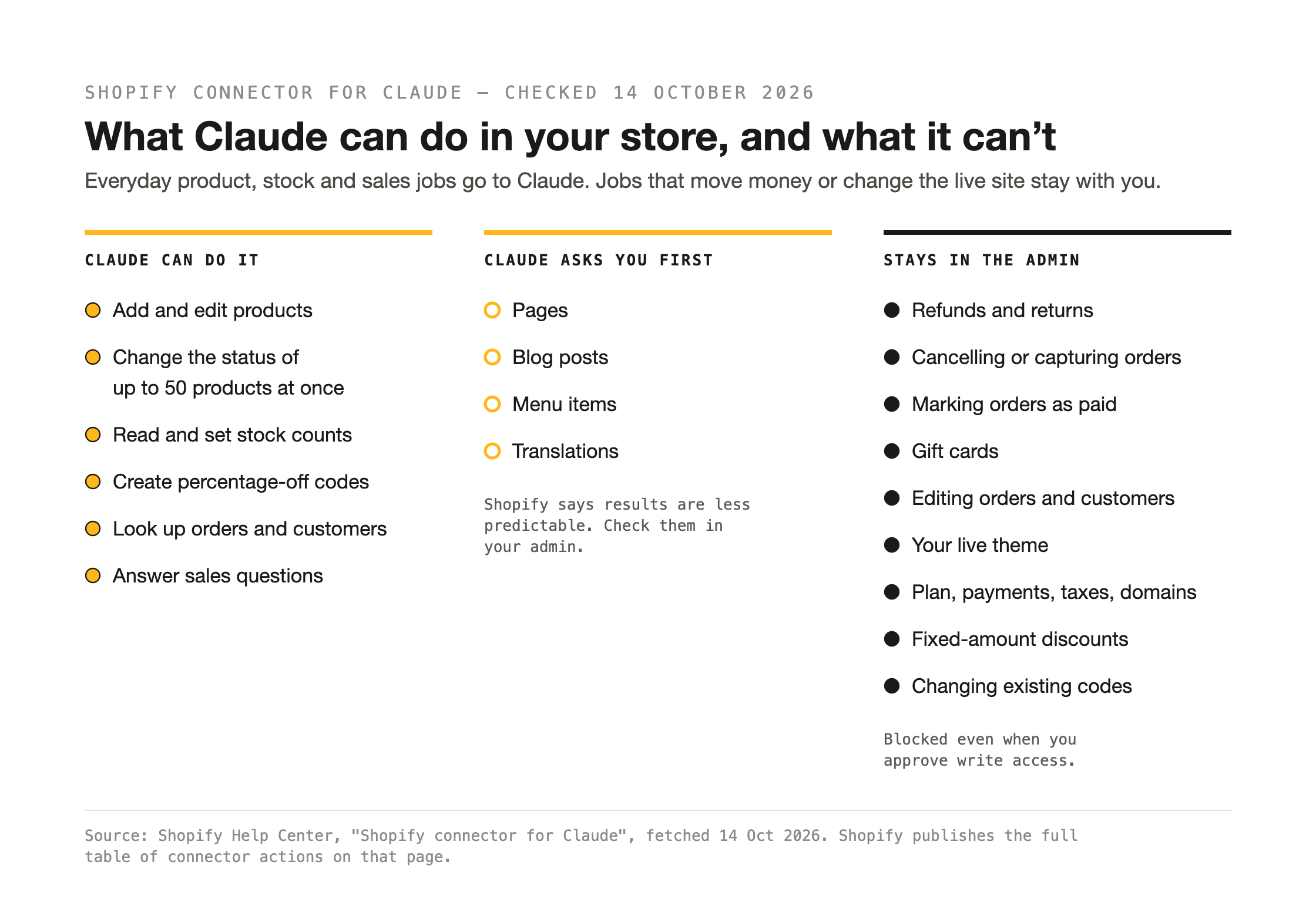
- Products. Claude can create a product with its price and variants, update titles, descriptions, images and variant prices, and change the status of up to 50 products at a time to active, draft or archived.
- Stock. Claude reads and sets stock counts. Shopify says the connector reads the current quantity first, so an update stops safely if the count changed after it looked.
- Discounts. Claude creates percentage-off discount codes for the whole store, chosen products, or a collection.
- Orders and customers. Claude looks up recent orders and customer records, including each customer’s order count and total spend.
- Sales questions. Claude answers questions about your sales, orders, products, and customers using the store’s analytics data, and shows results as tables and charts. One of Shopify’s example requests is “Show me my total sales for the last 30 days, broken down by product.”
Claude can also create pages, blog posts, menu items and translations, but Shopify gives it no purpose-built tool for these. Claude works through Shopify’s general admin system instead and has to work out the steps itself, so Shopify says the connector asks you to confirm before it makes one of these changes, and that the results are less predictable. Check what Claude built in your Shopify admin before you rely on it.
Shopify publishes a table of every action the connector can take and what each one does. That table is the list to check your own jobs against.
Sidekick is a separate tool. It is Shopify’s AI assistant inside the Shopify admin, and Shopify says the connector doesn’t replace it.
What stays in the Shopify admin
Shopify keeps the jobs that move money or change the live site in the admin. The connector cannot issue refunds, cancel or capture orders, mark orders as paid, process returns or create and adjust gift cards. Shopify says these actions are “blocked even when you approve write access”.
Shopify also sets out the rest of the jobs that stay with you:
- Your live theme. The connector can change a theme that is not published. You edit, publish, or delete the live theme in the admin.
- Store settings. Your plan, payments, taxes and domains are changed in the admin.
- Orders and customer records. The connector reads them and leaves them as is. To edit, refund or cancel an order, you use the admin.
- Other discount work. Fixed-amount discounts and changes to codes you already have are made in the admin.
Shopify adds one practical warning. The connector changes items one at a time, so a large batch can stop partway, and you finish any stopped batch in the admin.
What it costs, and which Claude plan you need
Shopify charges nothing extra. Its help page says there is “no extra Shopify fee for using the connector”. Your normal Shopify plan pricing still applies, and you pay Anthropic for any Claude subscription.
Anthropic’s help centre says web connectors are “available for all users”, and Anthropic’s pricing page marks connectors as included on the Free plan as well as the paid ones. Neither company says whether the Free plan’s usage limits are enough for regular store work.
On Claude’s Team and Enterprise plans, an Owner or Primary Owner has to switch connectors on for the organisation before members can use them. Each person then signs in on their own.
For an Australian store, no one has published an answer yet. Neither Shopify’s connector page nor Claude’s listing says whether the connector works with an Australian store, and neither mentions any country limit.
What access you give Claude, and how to take it back
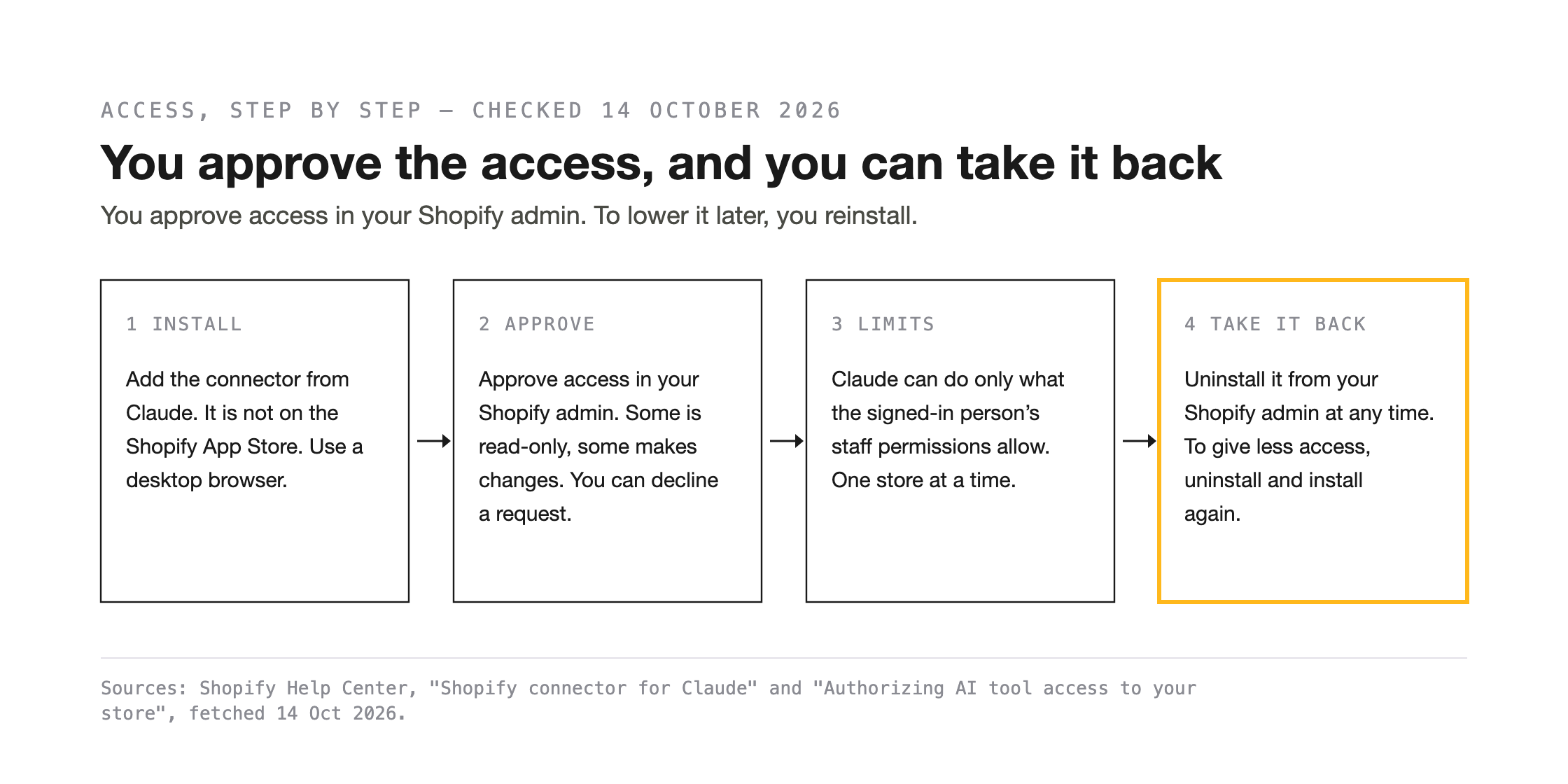
You install the connector from Claude, and Shopify does not list it on the Shopify App Store. Shopify says Claude then sends you to your Shopify admin to approve the data access the connector asks for, and that you should use a desktop browser for setup.
At that approval step, Shopify explains that some access is read-only and some lets the tool make changes, and you can decline a request you are not comfortable with. Claude is also held to the permissions of the person using it. A staff member who can view products but not edit them cannot give Claude the ability to edit them. The connector works with one store at a time.
You take access back in Shopify. You can revoke an AI tool’s access at any time by uninstalling the integration from your Shopify admin. Shopify doesn’t let you lower an access level once you have approved it, so giving Claude less access means uninstalling and reinstalling.
Claude also has its own controls. Shopify notes that Claude can limit the connector to specific conversations, and whoever owns your Claude workspace can restrict it. Anthropic’s help centre shows a tool permissions setting where you can set each tool, or group of tools, to Always allow, Needs approval, or Blocked. Anthropic introduces that setting for Team and Enterprise owners. If your plan shows it, check which setting the Shopify connector is on before you give Claude its first job.
What happens to your store and customer data
Once you approve sharing, Shopify says “your data leaves the Shopify environment and is governed by that provider’s terms and privacy policy”. For this connector the provider is Anthropic, and Anthropic’s terms depend on your Claude plan.
On the Free, Pro and Max plans, Anthropic says it uses chats to improve its models only if you allow it, if you opt in through a programme such as its Trusted Tester Program, or if a chat is flagged for a safety review. Writing about connectors in general, with Google Drive as its example, Anthropic says the chat data it uses “does not include raw content from connectors”, though anything copied straight into the conversation can be included. If you delete a conversation on those plans, Anthropic removes it from your chat history straight away and from its storage systems within 30 days.
Team and Enterprise plans follow a separate set of terms. Anthropic’s privacy article for those plans covers its commercial products, such as Claude for Work, and says Anthropic does not use your inputs or outputs to train its models by default.
Anthropic also says connected services process data on their own infrastructure, under their own terms, which may be located outside the United States. Customer records are part of what the connector can read, including name, email, phone, order count and total spend, so read Anthropic’s terms for your plan before you ask Claude about customers.
Connect it, or wait
- Connect it now if your jobs are on Shopify’s action table, such as adding products, correcting stock counts, making percentage-off codes or pulling a sales report. Shopify charges nothing extra, and you can uninstall the connector from your Shopify admin whenever you choose.
- Wait if your jobs are ones Shopify blocks, such as refunds or edits to the live theme, or if you need a published answer on Australian stores before you rely on it.
Before you connect anything, write down three ecommerce store jobs you would hand to Claude this month and check each one against Shopify’s action table and the jobs that stay in the admin. A job on the table is one the connector can do, within the access you approve. We think a sales question is the best place to start, because the connector reads analytics data without changing it, and you can check Claude’s answer against the reports you already use.
If you would like a second opinion on your three jobs, send the list to us through our contact page. Nicholas Duell handles enquiries and leads the work, and we typically respond within one business day.
References
- Shopify Help Center, “Shopify connector for Claude”, https://help.shopify.com/en/manual/ai-powered-tools/connecting-ai-tools/shopify-connector-for-claude (fetched 14 October 2026)
- Shopify Help Center, “Authorizing AI tool access to your store”, https://help.shopify.com/en/manual/ai-powered-tools/connecting-ai-tools/authorizing-access (fetched 14 October 2026)
- Anthropic, Claude connector directory, “Shopify”, https://claude.com/connectors/shopify (fetched 14 October 2026)
- Anthropic, Claude Help Center, “Use connectors to extend Claude’s capabilities”, https://support.claude.com/en/articles/11176164-use-connectors-to-extend-claude-s-capabilities (fetched 14 October 2026)
- Anthropic, Claude pricing, https://claude.com/pricing (fetched 14 October 2026)
- Anthropic Privacy Center, “Is my data used for model training?” (consumer products, dated 16 March 2026), https://privacy.claude.com/en/articles/10023580-is-my-data-used-for-model-training (fetched 14 October 2026)
- Anthropic Privacy Center, “How long do you store my data?” (consumer products, dated 1 July 2026), https://privacy.claude.com/en/articles/10023548-how-long-do-you-store-my-data (fetched 14 October 2026)
- Anthropic Privacy Center, “Is my data used for model training?” (commercial products), https://privacy.claude.com/en/articles/7996868-is-my-data-used-for-model-training (fetched 14 October 2026)
- Duelling Pixels, contact page, https://duellingpixels.com/contact (fetched 14 October 2026)


Leave a Reply