
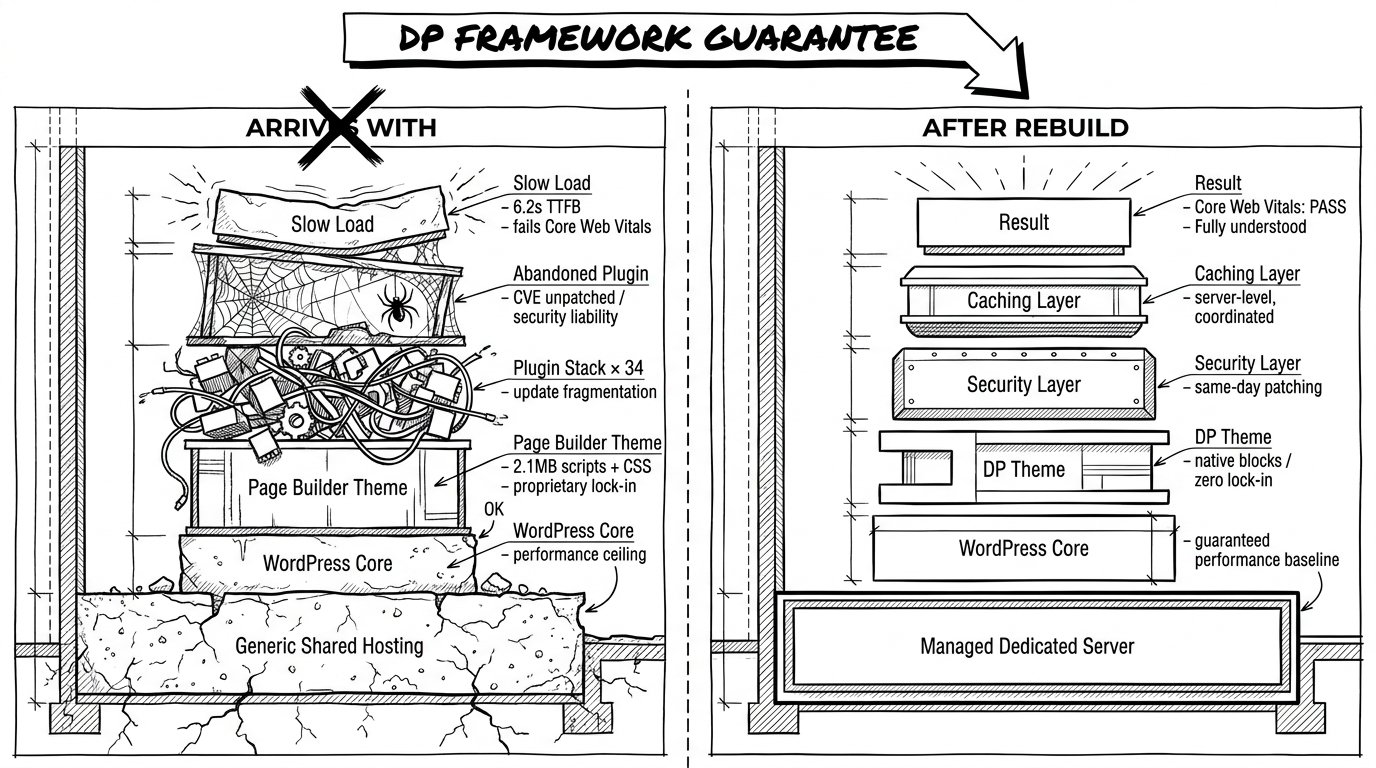
Most hosting companies will take any website you give them. We don’t.
When you join our managed hosting, one of the first things we do is rebuild your site—or upgrade it to our framework. Prospects ask about this a lot, so it’s worth explaining plainly: why we do it, what it means for your site, and what you get on the other side.
The problem with hosting a site you didn’t build
Hosting outcomes depend on the whole stack. The server matters. But what runs on the server matters just as much — often more.
A fast server can’t rescue a theme that ships 2MB of scripts and style files on every page. Hourly security scanning can’t protect a site running an abandoned plugin with a known vulnerability. Uptime guarantees mean very little if a poorly written page builder throws PHP errors under load.
This is the honest answer to “why can’t you just host what I’ve already got?” We can. Plenty of hosts do. But then we can’t stand behind the results — speed, security, stability — because we don’t control the things those results actually depend on.
So we made a choice years ago: we’d rather control the stack and guarantee the outcome than host anything that comes through the door and hope for the best.
What a decade of WordPress has taught us
WordPress is an extraordinary platform. It’s also an ecosystem with very few rules about what plugin or theme authors can ship.
Some plugins are beautifully written, maintained for years, and audited for security. Others are abandoned the week after launch. Some themes are built to WordPress standards and play nicely with everything else. Others fight the platform at every turn, loading their own jQuery, their own CSS reset, their own everything — and slowing the site to a crawl while they’re at it.
After building and managing lots of WordPress sites, we know which patterns hold up and which don’t. We know which page builders create technical debt that costs more to maintain than to rebuild. We know which security plugins actually help and which give a false sense of safety. We know which theme frameworks make a site faster and which make it slower.
We’re not the only people who know this. But we’ve made it the basis of how we work.
Two paths: rebuild within, or upgrade to
When you join our hosting, there are two ways forward.
Rebuild within your existing design. If your site looks the way you want it to and the content is working, we keep what you have visually and rebuild the underlying framework. Same site, faster engine, secure foundation. Your customers see no difference except a site that loads quicker.
Upgrade to our framework. If your current site has deeper problems — outdated design, poor mobile experience, accumulated plugin sprawl — we rebuild it on our framework from the ground up. You end up with a site that’s faster, more secure, and easier to grow.
Either way, the destination is the same: a site we understand completely, running on a stack we maintain, on hosting we control.
What our framework actually gives you
Our theme framework is a WordPress theme we built and maintain in-house. It uses WordPress’s native block editor, which means no proprietary lock-in, no learning curve if you want to edit content yourself, and is built on the Sage Theme by Roots. An open-sourced theme that is actively updated and backed with over 13,200 GitHub stars.
It’s built for speed. It’s built to play nicely with the security and caching layers running on our servers. And because we wrote it, we can fix it, extend it, and harden it the moment we need to.
That last point is the one most prospects underestimate. When a security advisory drops for a popular plugin, every site running it is exposed until that plugin’s author releases a patch — which can take days or weeks. When something needs fixing inside our framework, the fix happens the same day. Often the same hour.
The honest trade-off
We should be straight about what this means.
If you’re attached to a specific page builder or a particular plugin we don’t support, the rebuild process means letting it go. We’ll show you what we use instead and why, but it’s a change. Most clients find the new setup easier to work with than what they had before. Some take a few weeks to adjust.
The other trade-off is time. A rebuild isn’t instant. Depending on the size of your site, it takes between two and six weeks. We do it once, properly, so we’re not patching the same problems every month afterwards.
You can’t guarantee the results of a system you don’t understand. We understand ours.
That’s why we rebuild.



Leave a Reply