
Google says its AI answers need no special optimisation. It said so in December 2025, and its July 2026 guide calls optimising for AI search “still SEO”. It lists pages Google can crawl, content people find useful, and accurate, up-to-date product data. The one new requirement is a Search Console setting, and it is on by default.
This Search Console list is the place to start. Check your store against it before you pay anyone for AI-specific work.
Google’s two pages on AI answers
Google’s two pages for site owners both say AI answers need no special work, and the newer one adds a Search Console setting. The first, AI features and your website, was last updated on 10 December 2025. The second, Optimizing your website for generative AI features on Google Search, was last updated on 10 July 2026 and is the fuller of the two.
Both pages cover the same two features. Google describes AI Overviews as a summary that helps people “get to the gist of a complicated topic or question more quickly”, with links to read further. AI Mode is for questions that need more exploration, reasoning or comparison, and it gives an AI-written response with links to supporting websites (Google). Since 20 May 2026 the two have run as one experience worldwide, so a search can move from an AI Overview straight into a follow-up question in AI Mode (Google).
On special work, the December page is direct. “There are no additional requirements to appear in AI Overviews or AI Mode, nor other special optimizations necessary” (Google). The July guide gives the reason. Google says its AI features “are rooted in our core Search ranking and quality systems”, and that from Google Search’s perspective, optimising for generative AI search “is optimizing for the search experience, and thus still SEO” (Google). So when someone sells you Google AI Overviews SEO, Google’s own name for that work is SEO.
To show as a link in either feature, Google says a page must be indexed, meaning stored by Google for Search, and eligible to show with a snippet, a short extract of its text (Google). The July guide adds one condition, that the site must be included in Search generative AI features in Search Console (Google). That control reached every website worldwide on 31 August 2026, and Google’s help page calls inclusion “the default control for all properties” (Search Console Help). Unless someone has switched it off, your store is already included.
Google also says “plenty of content thrives in Google Search (including generative AI experiences) without any overt SEO at all” (Google).
What Google names for its AI features
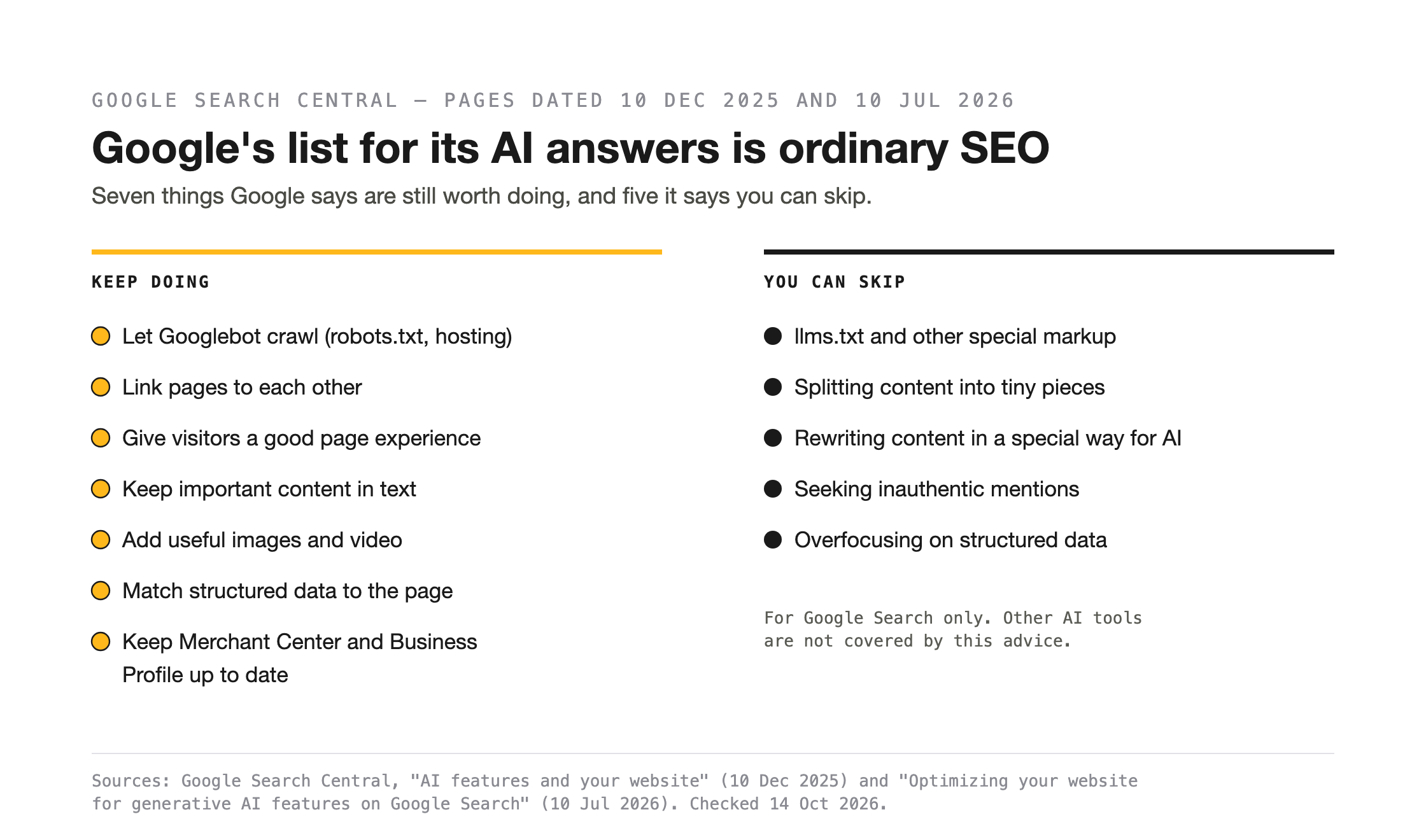
Google calls its AI features ordinary SEO, and for stores, it includes up-to-date product data. The December page lists the SEO fundamentals Google says “continue to be worthwhile” for AI Overviews and AI Mode (Google). In Google’s order, they are:
- Allow crawling. Google defines a crawler as any program that finds and scans websites automatically (Google). Google names two places that can block one. The first is robots.txt, the file of rules for Googlebot, Google’s Search crawler, which Google calls the control for how Search crawls your site (Google). The second is your hosting infrastructure, which your host can check.
- Make content easy to find through internal links.
- Give visitors a great page experience.
- Keep important content in text form.
- Support the text with high-quality images and video, where they help.
- Make sure your structured data matches the visible text on the page. Google defines structured data as a standard format for describing a page and classifying its content (Google).
- Check that your Merchant Center and Business Profile information is up to date. Google describes Merchant Center as a free tool where you upload product data so products can show across Search, Maps, YouTube and more (Google Merchant Center Help).
The July guide asks for crawlable content, a good page experience, less duplicate content and a site verified in Search Console (Google). Then it puts content first. Google says content people find unique, compelling and useful will likely influence a site’s presence in AI search “more than any of the other suggestions in this guide”. Its example of commodity content is “7 Tips for First-Time Homebuyers”. Its opposite example is “Why We Waived the Inspection & Saved Money”. In a store, the same test separates a buying guide that repeats the supplier’s spec sheet from one written by staff who have used the product.
Google also warns against the shortcut. Fan-out queries are the related searches Google’s model runs to gather more results for a question (Google). Writing a separate page for every search variation, including fan-out queries, breaks Google’s scaled content abuse spam policy when done “primarily to manipulate rankings or generative AI responses”. Google’s page on AI-generated content describes scaled content abuse as generating many pages that add no value (Google).
Google’s helpful content page, updated on 5 October 2026, turns the content point into questions you can ask of your own pages. Among them:
- Does the page give original information, reporting, research or analysis?
- Does it describe the topic completely?
- Does the title give a descriptive, helpful summary of the page?
- Is it obvious to visitors who wrote it?
- Does it show first-hand expertise, such as from having used the product?
The same page says Google has no preferred word count, so there is no target length to write to.
What Google says you can skip
Google names five common AI SEO tasks you can skip for Google Search. This is Google’s advice for its own search results, and it doesn’t apply to other AI tools. The five sit in the July guide’s section on what you “don’t need to do” for generative AI search (Google):
- AI text files such as llms.txt and other special markup
- breaking content into tiny pieces
- rewriting content in a special way for AI
- seeking inauthentic mentions across the web
- overfocusing on structured data
On llms.txt and similar AI text files, Google says creating one “will neither harm nor help” a site’s visibility in Google Search, because Google Search ignores them. It adds that keeping one is “completely fine” for other services or systems that use these files. The December page says you don’t need to add any special structured data for AI features (Google). The July guide says it is still “a good idea to continue using” structured data, because it helps pages be eligible for rich results (Google), search listings that show extras such as review stars (Google).
Google also names the industry’s labels. It calls AEO (answer engine optimisation) and GEO (generative engine optimisation) terms for AI search work, and it tells owners to check any such advice against its official guidance (Google). Its page on hiring an SEO lists “Optimizing for generative AI” among SEO services and suggests you ask whether that advice is “aligned with Google Search’s official guidance on optimizing for generative AI features” (Google). The July guide adds that no third-party tool has access to Google’s internal ranking or AI systems. We made a similar point in May, that AEO sold as a new service is SEO under a new label and at a higher price.
Product data and Google’s AI answers
Google’s July guide says AI answers can include product listings and product information, and that Merchant Center feeds and Google Business Profiles “can help” your products be visible in both AI answers and other Search results (Google). Google uses “product data” to mean a product’s title, description, colour, price, availability and similar details (Google).
Google offers two ways to provide that data. One is structured data on your product pages, which Google explains on its merchant listing structured data page. The other is a feed, a file of your product data, uploaded to Merchant Center. Google says Merchant Center is not required to appear in Google search results, but it helps Google know your products, and it is required for some places, such as the Shopping tab. On the platforms, Google says a Shopify store can be connected to Merchant Center so product information syncs automatically (Google Merchant Center Help). WooCommerce says its Google for WooCommerce plugin uploads store and product data so products sync for free listings and other Google services (WooCommerce).
Three Merchant Center rules affect Australian stores directly:
- The price you submit must match the price on the product page, in the structured data and at checkout (Google Merchant Center Help).
- Stores in Australia must set up shipping settings or add shipping costs for free listings (Google Merchant Center Help).
- Product titles and descriptions written with AI must be submitted separately and labelled as AI-generated (Google).
Free listings are Google’s unpaid product listings. Eligible products may show in Search, Images, Lens, YouTube, Gemini and the Shopping tab, though eligibility “doesn’t guarantee that your products will be shown” (Google Merchant Center Help).
Conversational attributes are optional product fields, such as questions and answers, that help AI systems understand a product. Google names AI Mode as one place they are used (Google Merchant Center Help), and said in May 2026 that retailers globally can use them (Google). Merchant Center’s help page on AI performance insights asks merchants to meet the free listings requirements and provide high-quality product data (Google Merchant Center Help).
On how a product is chosen for an AI Overview or an AI Mode answer, Google says only that this data “can help”.
What is live in Australia
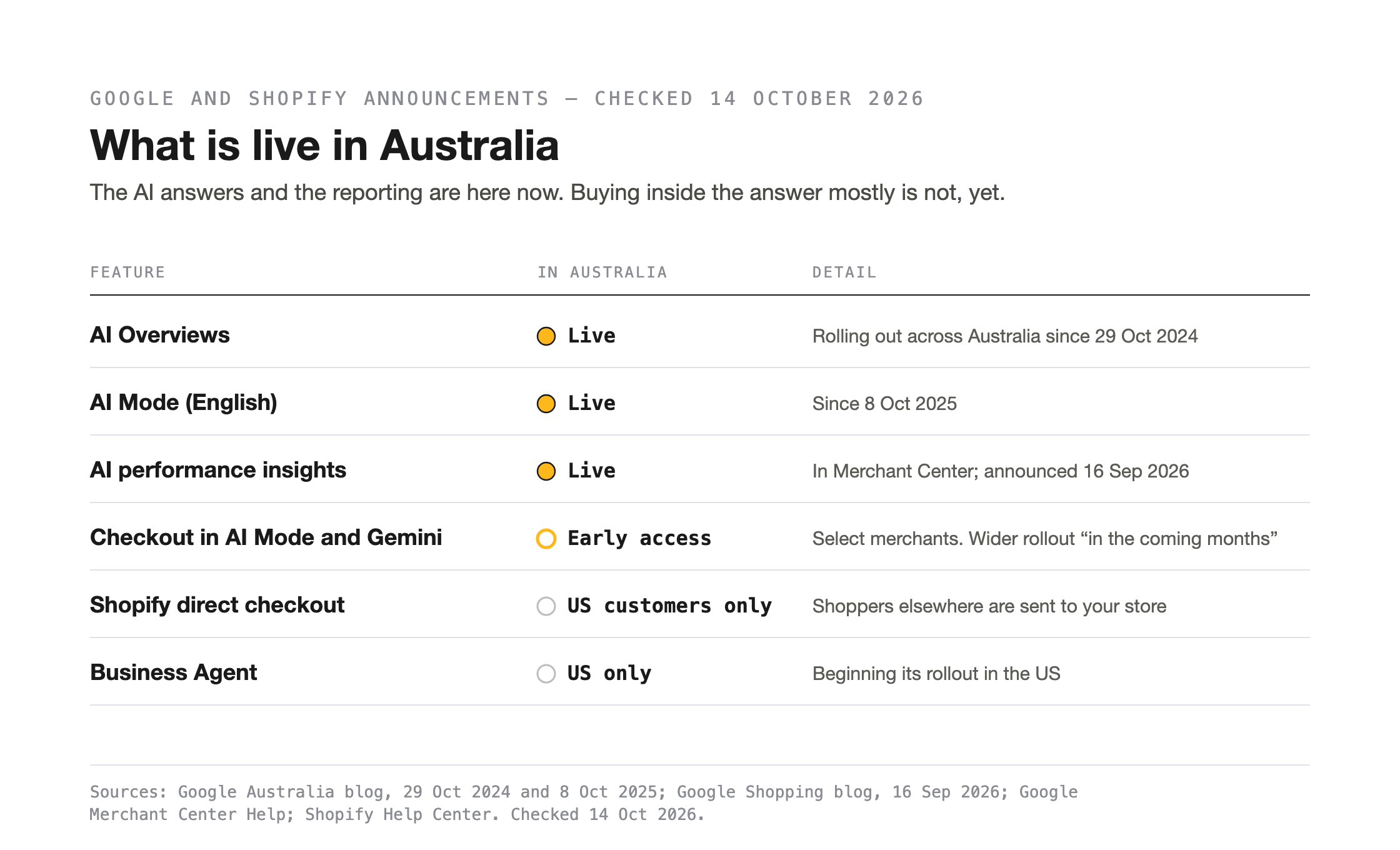
AI Overviews, AI Mode and Merchant Center’s AI performance insights are live in Australia now, while checkout in AI Mode and Business Agent start in the US. Google began rolling out AI Overviews across Australia on 29 October 2024 (Google Australia) and AI Mode, in English, on 8 October 2025 (Google Australia). On 16 September 2026, Google said its AI performance insights report in Merchant Center is available to businesses in Australia (Google). It compares your share of voice, meaning how often your brand appears against the competitors defined in Merchant Center, in AI Mode and AI Overviews, for English-language queries and organic traffic only (Google Merchant Center Help).
Checkout inside AI Mode and Gemini is available to select merchants, with products eligible in the US, Canada and Australia (Google Merchant Center Help). In May 2026, Google said this checkout would roll out across Australia “in the coming months” (Google). Its September post gives early 2027 for updated checkout tools in Merchant Center to reach Australia (Google), and neither post gives a firm date for an ordinary Australian store.
Shopify says direct checkout in Google AI Mode and Gemini shows only to US customers, and shoppers elsewhere are sent to your store to buy (Shopify). Business Agent, which lets shoppers chat with a brand in Search, is beginning its rollout in the US (Google Merchant Center Help). Google’s July guide files agent work under “if this is something that’s relevant to your business and you have extra time” (Google).
Check your store against Google’s list
Each item Google names can be checked in tools you already have:
- In Search Console, open the Search generative AI control and confirm your site is still included. Google says excluding a site means no impressions or traffic from these features (Search Console Help).
- In Search Console, open the Generative AI performance report. It shows impressions for AI Overviews and AI Mode together, not clicks, and a site with too few impressions may not see it (Search Console Help). In the main Performance report, a click on a link in AI Mode counts as a click (Search Console Help).
- Ask your developer or host to confirm that robots.txt and your hosting let Googlebot reach your pages.
- Treat Google-Extended as a separate decision. You can add it to robots.txt to limit how Google uses the pages it crawls. Google says it controls whether your content is used to train future Gemini models and as source material for answers in the Gemini apps, and that it does not affect inclusion in Google Search (Google).
- On your best-selling product pages, compare the structured data with the visible page, and the price in Merchant Center with the price on the page and at checkout.
- In Merchant Center, confirm your Shopify or WooCommerce store is connected, products are current, and shipping is set for Australia.
- In Merchant Center, open AI performance insights to see how often your brand appears against competitors in AI Mode and AI Overviews.
- Read your best-selling product and category pages against Google’s helpful content questions.
Before you pay for AI SEO
Google’s page on hiring an SEO says “No one can guarantee a #1 ranking on Google” and tells owners to beware of SEOs who claim to (Google). Google Search Essentials adds that it costs nothing to appear in Google Search results, “no matter what anyone tries to tell you” (Google).
If you would like to see where your ecommerce store stands before you change anything, Nicholas can run our free AI Search report. It asks five AI tools 50 buyer questions, including Google AI Overviews and Google AI Mode, and leaves your site unchanged. Each question is asked once, and AI answers vary between runs, so the report records your position on the day. It is the first of four steps in our AI visibility method, followed by what is holding the store back, the changes and the same questions asked again. We typically respond within one business day.
References
- Google Search Central, “AI features and your website”, last updated 10 December 2025. https://developers.google.com/search/docs/appearance/ai-features
- Google Search Central, “Optimizing your website for generative AI features on Google Search”, last updated 10 July 2026. https://developers.google.com/search/docs/fundamentals/ai-optimization-guide
- Google Search Central, “Creating helpful, reliable, people-first content”, last updated 5 October 2026. https://developers.google.com/search/docs/fundamentals/creating-helpful-content
- Google Search Central, “Google Search Essentials”, last updated 10 December 2025. https://developers.google.com/search/docs/essentials
- Google Search Central, “Do you need an SEO?”, last updated 5 June 2026. https://developers.google.com/search/docs/fundamentals/do-i-need-seo
- Google Search Central, “Google Search’s guidance on using generative AI content on your website”, last updated 1 October 2026. https://developers.google.com/search/docs/fundamentals/using-gen-ai-content
- Google Search Central, “Overview of Google crawlers and fetchers (user agents)”, last updated 12 June 2026. https://developers.google.com/search/docs/crawling-indexing/overview-google-crawlers
- Google Search Central, “Google’s common crawlers”, last updated 14 July 2026. https://developers.google.com/search/docs/crawling-indexing/google-common-crawlers
- Google Search Central, “Intro to how structured data markup works”, last updated 10 December 2025. https://developers.google.com/search/docs/appearance/structured-data/intro-structured-data
- Google Search Central, “Merchant listing (Product, Offer) structured data”, last updated 8 September 2026. https://developers.google.com/search/docs/appearance/structured-data/merchant-listing
- Google Search Central, “Review snippet (Review, AggregateRating) structured data”, last updated 8 September 2026. https://developers.google.com/search/docs/appearance/structured-data/review-snippet
- Google Search Central, “Share your product data with Google”, last updated 10 December 2025. https://developers.google.com/search/docs/specialty/ecommerce/share-your-product-data-with-google
- Google Search Console Help, “Search generative AI control” (undated, checked 14 October 2026). https://support.google.com/webmasters/answer/16908024
- Google Search Console Help, “Generative AI performance report (Search)” (undated, checked 14 October 2026). https://support.google.com/webmasters/answer/16984139
- Google Search Console Help, “Performance report” (undated, checked 14 October 2026). https://support.google.com/webmasters/answer/7042828
- Google Merchant Center Help, “Create a Merchant Center account” (undated, checked 14 October 2026). https://support.google.com/merchants/answer/188924
- Google Merchant Center Help, “How to upload your products to Merchant Center” (undated, checked 14 October 2026). https://support.google.com/merchants/answer/7439882
- Google Merchant Center Help, “Product data specification” (undated, checked 14 October 2026). https://support.google.com/merchants/answer/7052112
- Google Merchant Center Help, “Free listings for products” (undated, checked 14 October 2026). https://support.google.com/merchants/answer/9199328
- Google Merchant Center Help, “How to use conversational attributes” (undated, checked 14 October 2026). https://support.google.com/merchants/answer/17085370
- Google Merchant Center Help, “About AI performance insights” (undated, checked 14 October 2026). https://support.google.com/merchants/answer/17200695
- Google Merchant Center Help, “About the Universal Commerce Protocol (UCP) and UCP-powered checkout feature on Google” (undated, checked 14 October 2026). https://support.google.com/merchants/answer/16837055
- Google Merchant Center Help, “Get started with Business Agent” (undated, checked 14 October 2026). https://support.google.com/merchants/answer/16410382
- Google, “100 things we announced at Google I/O 2026”, 20 May 2026. https://blog.google/innovation-and-ai/technology/ai/google-io-2026-all-our-announcements/
- Google, “How we’re helping retailers thrive with new Universal Commerce Protocol features and AI tools on Google”, 20 May 2026. https://blog.google/products-and-platforms/products/shopping/shopping-updates-google-marketing-live/
- Google, “Boost your holiday sales with these agentic commerce updates”, 16 September 2026. https://blog.google/products-and-platforms/products/shopping/google-shopping-updates-holiday-shopping/
- Google Australia, “Introducing AI Overviews in Australia, a new generative AI experience on Search”, 29 October 2024. https://blog.google/intl/en-au/company-news/outreach-initiatives/ai-overviews-australia/
- Google Australia, “Google Search: Introducing AI Mode in Australia”, 8 October 2025. https://blog.google/intl/en-au/products/explore-get-answers/ai-mode-in-australia/
- Shopify Help Center, “Selling on Google AI Mode and Gemini” (undated, checked 14 October 2026). https://help.shopify.com/en/manual/online-sales-channels/agentic-storefronts/google
- WooCommerce, “Google for WooCommerce” documentation (undated, checked 14 October 2026). https://woocommerce.com/document/google-for-woocommerce/
- Duelling Pixels, “Google’s I/O Was Not About AI. It Was About Replacing the Open Web.”, 29 May 2026. https://duellingpixels.com/blog/business-online/googles-i-o-was-not-about-ai-it-was-about-replacing-the-open-web/
- Duelling Pixels, AI Search Optimisation & GEO, new site build, 21 October 2026. https://duellingpixels.com/ai-search-optimisation/
- Duelling Pixels, contact page (checked 14 October 2026). https://duellingpixels.com/contact

Leave a Reply