
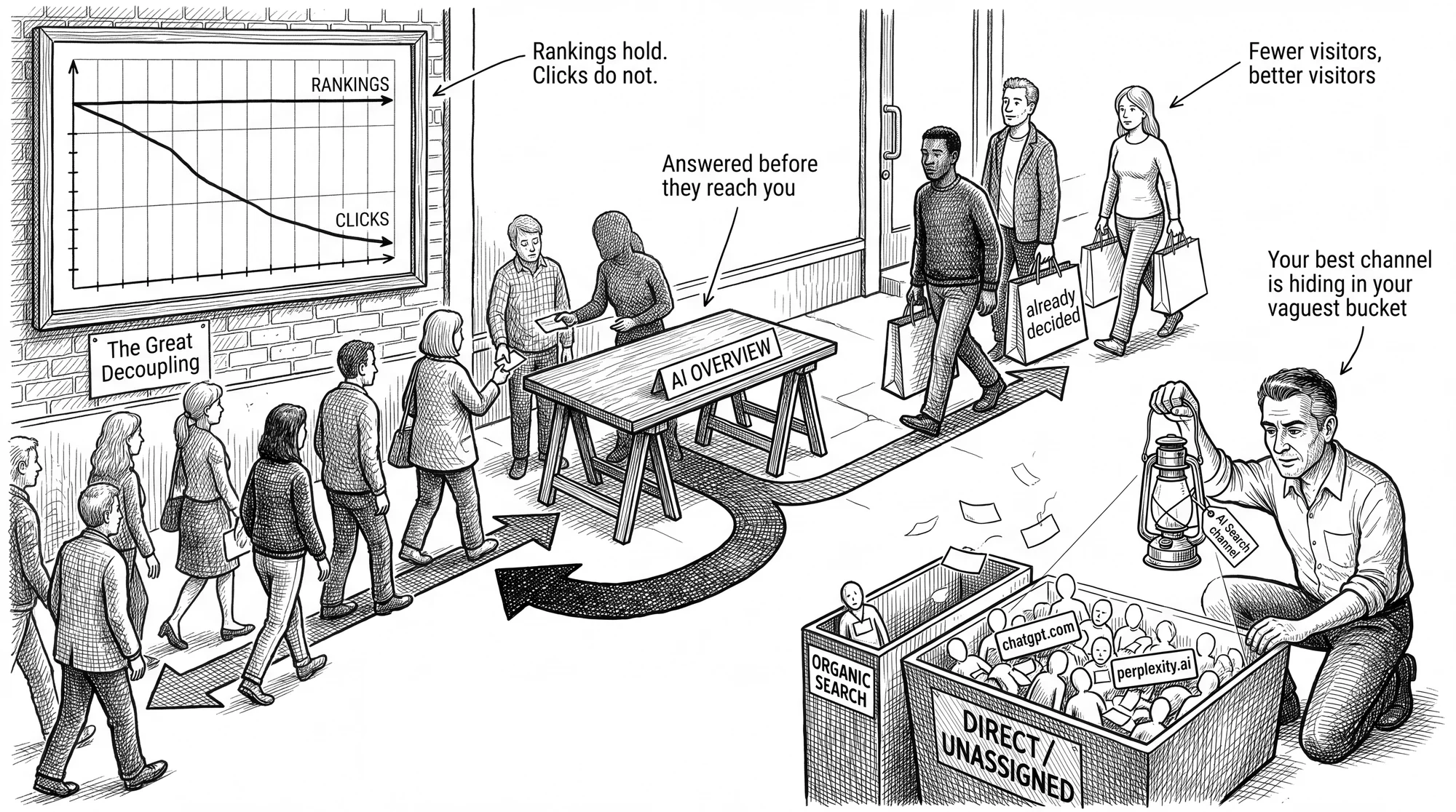
Open Google Search Console and look at your last six months of data. For many businesses, the pattern will be the same. Rankings holding steady, impressions mostly climbing, clicks dropping dramatically. Your SEO is not broken. The scoreboard of how we measure is.
Analysts tracking over 300,000 keywords call this the Great Decoupling, and it is the single most useful concept for reading your analytics in 2026 (Ahrefs, 2026). One can no longer predict positions, impressions and clicks, because Google answers, AKA AI Overviews, now appear above the links. In our last article on why your website is now a knowledge site, we covered the strategy. This article covers the measurement. What the numbers actually mean, which new numbers to watch, and two practical fixes that make AI traffic visible in Google Analytics.
What the Great Decoupling looks like in your data
When Google shows an AI Overview, the click-through rate collapses from the top of the page down.
For informational keywords that trigger an AI Overview, the average click-through rate for position one fell from 7.3% to 1.6% between December 2023 and December 2025 (Ahrefs, 2026). Isolating the effect of the Overview itself, Ahrefs measured a 58% relative reduction in clicks for the top organic result. The suppression runs all the way down the page.
| Position | Relative decline in clicks |
|---|---|
| 1 | -58.0% |
| 2 | -50.8% |
| 3 | -46.4% |
| 5 | -32.6% |
| 10 | -19.4% |
There is one piece of better news appearing in the 2026 data, the decline has stopped accelerating. Seer Interactive found that organic click-through on Overview queries rebounded from its late 2025 low of 1.3% to 2.4% by early 2026, suggesting users have settled into a pattern in which complex or high-stakes questions still earn a click to the source (Seer Interactive, 2026). The remaining clicks are fewer, and they are being awarded differently.
The clicks you keep are worth more
The traffic that survives this compression is disproportionately valuable, and it flows to the businesses named inside the answer.
Seer Interactive’s data shows that earning a citation inside an AI Overview yields roughly 120% more organic clicks per impression than an uncited page ranking for the same query (Seer Interactive, 2026). The citation is the new position one.
The quality gap is even larger than the click gap. One vendor analysis found AI referral traffic converting at 4.4 times the rate of organic search (Growth Marshal, 2026). Treat that figure as directional, since it comes from a firm selling AI search services, though independent data points do the same. Microsoft Clarity measured AI traffic converting at three times the rate of other channels across 1,200 publisher sites (Microsoft Clarity, 2026), and retail data across 130 large North American retailers showed AI-referred visitors converting 42% better than standard traffic, with 37% more revenue per visit and 48% longer sessions (Digital Applied, 2026).
The logic is simple, a traditional search user is still researching. An AI-referred visitor has already been walked through the options within the AI chat interface and is close to a decision. Fewer clicks, better buyers. We covered the small business implications of this trade in our SEO vs AEO guide. The rest of this article is about seeing it in your own numbers.
Generative share of voice is the KPI to watch
The metric that replaces ranking position is generative share of voice, the percentage of AI answers in your category that name your business.
The formula is straightforward. Divide your brand mentions by total category mentions across a set of test prompts, then multiply by 100. If you ask ten buying questions in your category and your business appears in four answers, your share of voice is 40% for that platform.
A practical monthly routine for a small business looks like this:
- Write down the ten questions your customers actually ask before they buy. Use their words, not your industry’s words. Ten is enough to start, and a competitive category may justify growing the list over time.
- Ask all ten in ChatGPT, Gemini, and Perplexity. The platforms weigh sources differently, so one check is not enough.
- Log who gets named, how you are described, and whether the description is accurate. Record citations and mentions separately. A citation is your website appearing as a linked source, and a mention is your brand named in the answer text without a link.
- Track the same prompts every month and watch the trend rather than any single answer.
The split between citations and mentions is your diagnostic. Frequent mentions with few citations means the AI knows your business but is not citing your pages, which usually points to on-site structure rather than reputation. Few of either means the off-page work comes first. AI answers are not deterministic. The same prompt can produce different answers on different days, which is why the trend across a fixed set of prompts matters more than any one result. Paid tracking tools can automate this at scale, and for most small businesses, an hour of your time each month tells you most of what you need to know. One refinement worth noting is that AI systems often break a complex question into several sub-questions before answering. Pages that cover multiple facets of a topic were 161% more likely to earn a citation than pages built around a single keyword (Ahrefs, 2026), so your test prompts should include follow-up style questions, not just the headline query.
Where your AI traffic hides in GA4
Most of the AI traffic you already get is sitting in your analytics labelled as something else.
One industry analysis estimates that over 70% of AI referral traffic arrives without clean referrer data (The Digital Bloom, via Demand Local, 2026). This happens for three reasons. Generative platforms often add a no-referrer setting to their outbound links, which blanks the referring site. Many users click through from a mobile app, and the handoff from app to browser destroys the referrer. Browser privacy features strip what remains. GA4 cannot classify what it cannot see, so these sessions land in Direct or Unassigned, and your best-converting channel disappears into your vaguest bucket.
Two fixes recover a useful share of it.
Fix one, build a dedicated AI channel group
A custom channel group in GA4 captures AI sessions that send a referrer and gives them their own line in your reports.
Before you build anything, check what GA4 already gives you. The default channel group now includes an AI Assistants channel, so some of this traffic is already labelled for you. Two caveats keep it from being the whole answer. It can only catch sessions that arrive with a clean referrer, which is the minority described above, and the definition belongs to Google. You cannot inspect which platforms are on the list or add to it. A custom group gives you coverage you control and can audit, which matters when you are explaining the numbers to someone else.
Create a new channel called AI Search in your GA4 property under Admin > Data display > Channel groups. Position it above the default Referral and Direct rules so it processes first.
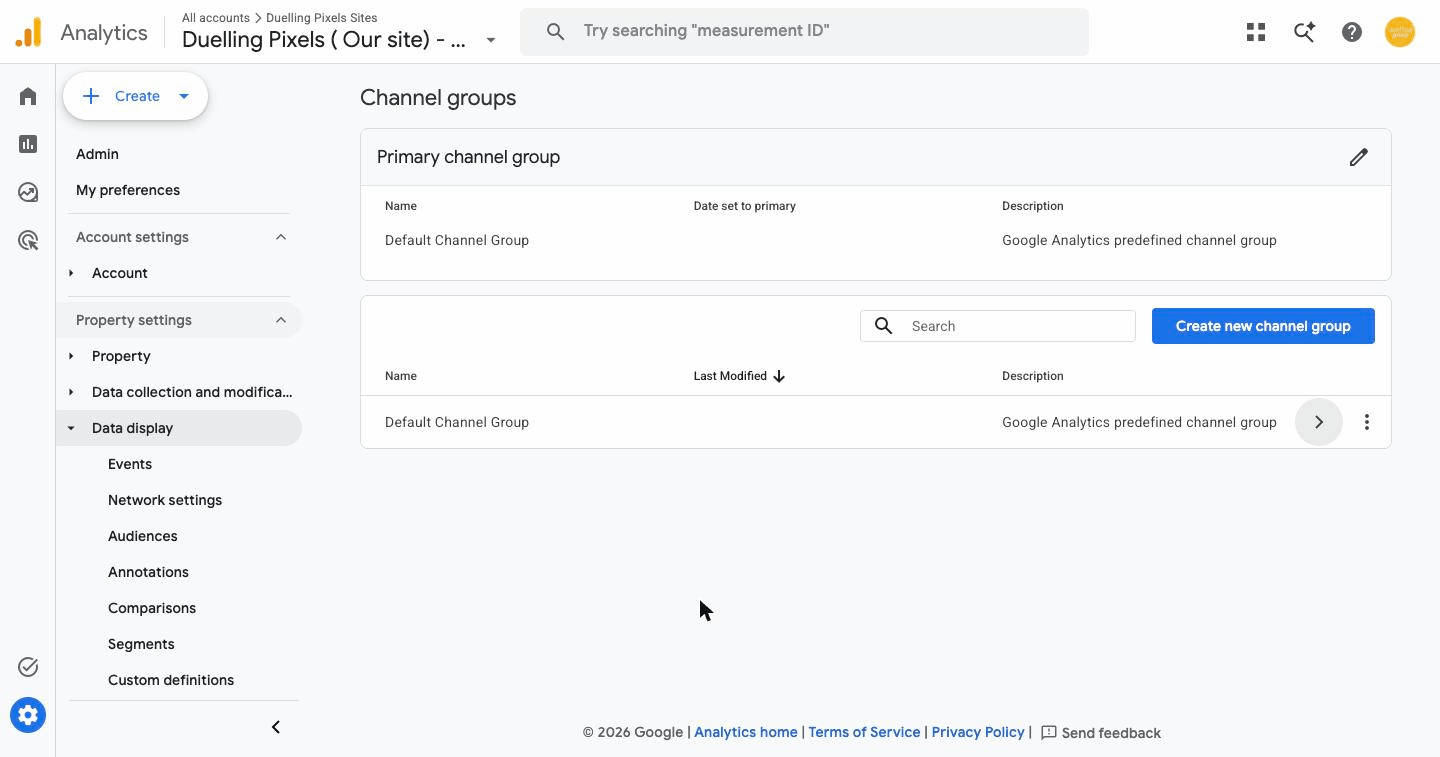
Set the dimension to Source, the match type to matches regex, and paste in a pattern that catches the main platforms:
^(meta\.ai|perplexity\.ai|chat\.openai\.com|claude\.ai|gemini\.google\.com|bard\.google\.com|chatgpt\.com|copilot\.microsoft\.com)$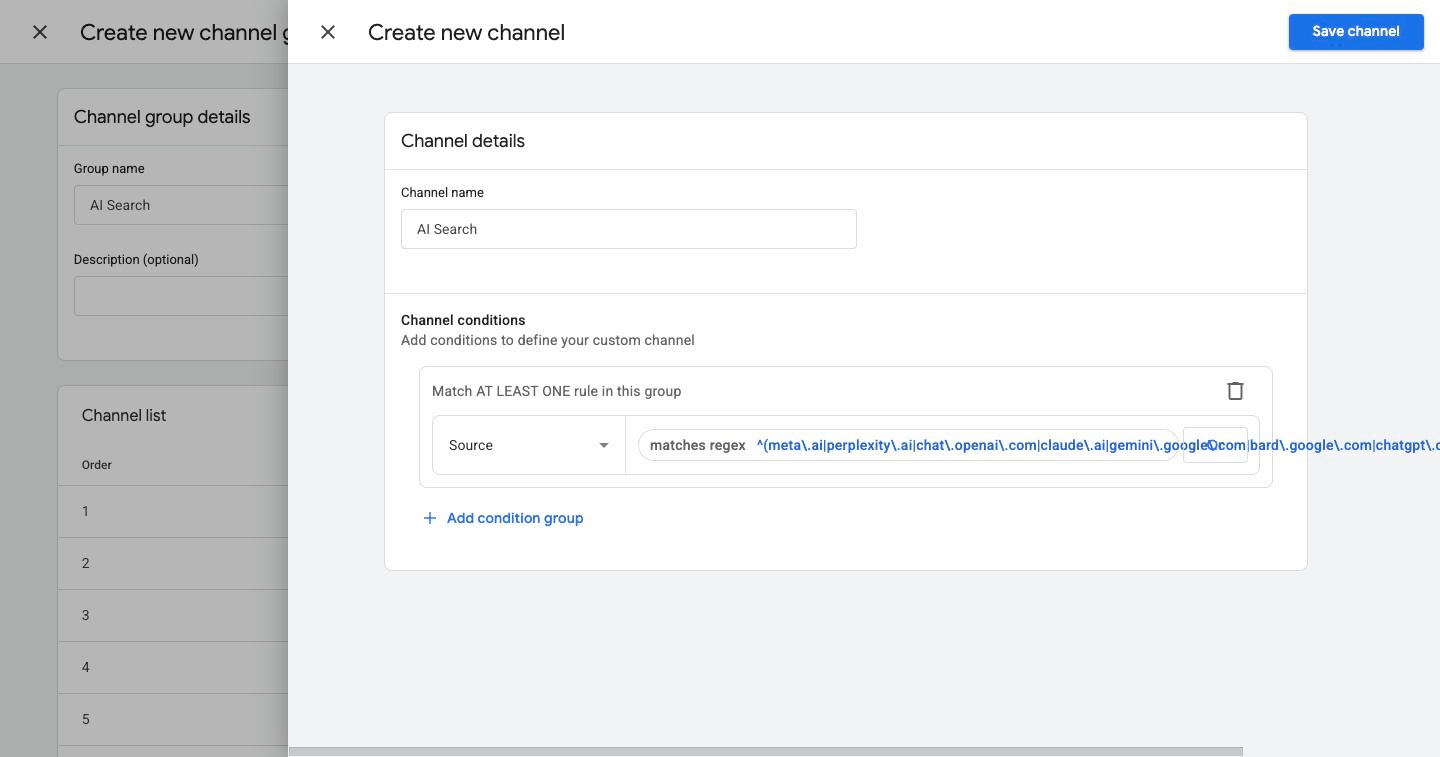
One detail here catches people out, and it is worth understanding rather than just copying. GA4’s Source dimension stores a bare hostname, not a full address. Pull up any traffic report and you will see values like google, bing and m.facebook.com, never https://google.com/. Plenty of versions of this regex float around with a ^https:\/\/ anchor on the front, and every one of them matches nothing at all. The channel saves without complaint, sits in your reports, and quietly reports zero sessions forever. If you have built one of these before and concluded you simply had no AI traffic, this is worth going back to check.
Two of those hostnames are historical. chat.openai.com and bard.google.com now redirect to chatgpt.com and gemini.google.com, so they will not match anything new. They cost nothing to leave in and they keep older sessions attributed correctly.
Once the channel is live, compare its engagement and conversion rates against those of your organic search channel. In our experience, the gap makes the case for AI readability work better than any industry statistic, because it is your data. For any AI surface you control, such as a link shared through your own chatbot or newsletter tools, add UTM parameters as well. You cannot inject UTMs into organic AI citations, so the channel group does the heavy lifting.
Fix two, catch AI Overview clicks with Tag Manager
Clicks from Google’s AI Overviews defeat the channel group entirely, because they arrive looking like ordinary Google traffic. There is a fingerprint you can capture.
When someone clicks a citation inside an AI Overview, Google often appends a text fragment to the URL, in the format #:~:text= followed by the passage the AI quoted. The browser uses it to scroll to and highlight that exact paragraph. Because everything after a # symbol never reaches your server, GA4 cannot see it natively (Analytics Playbook, 2026). Google Tag Manager can.
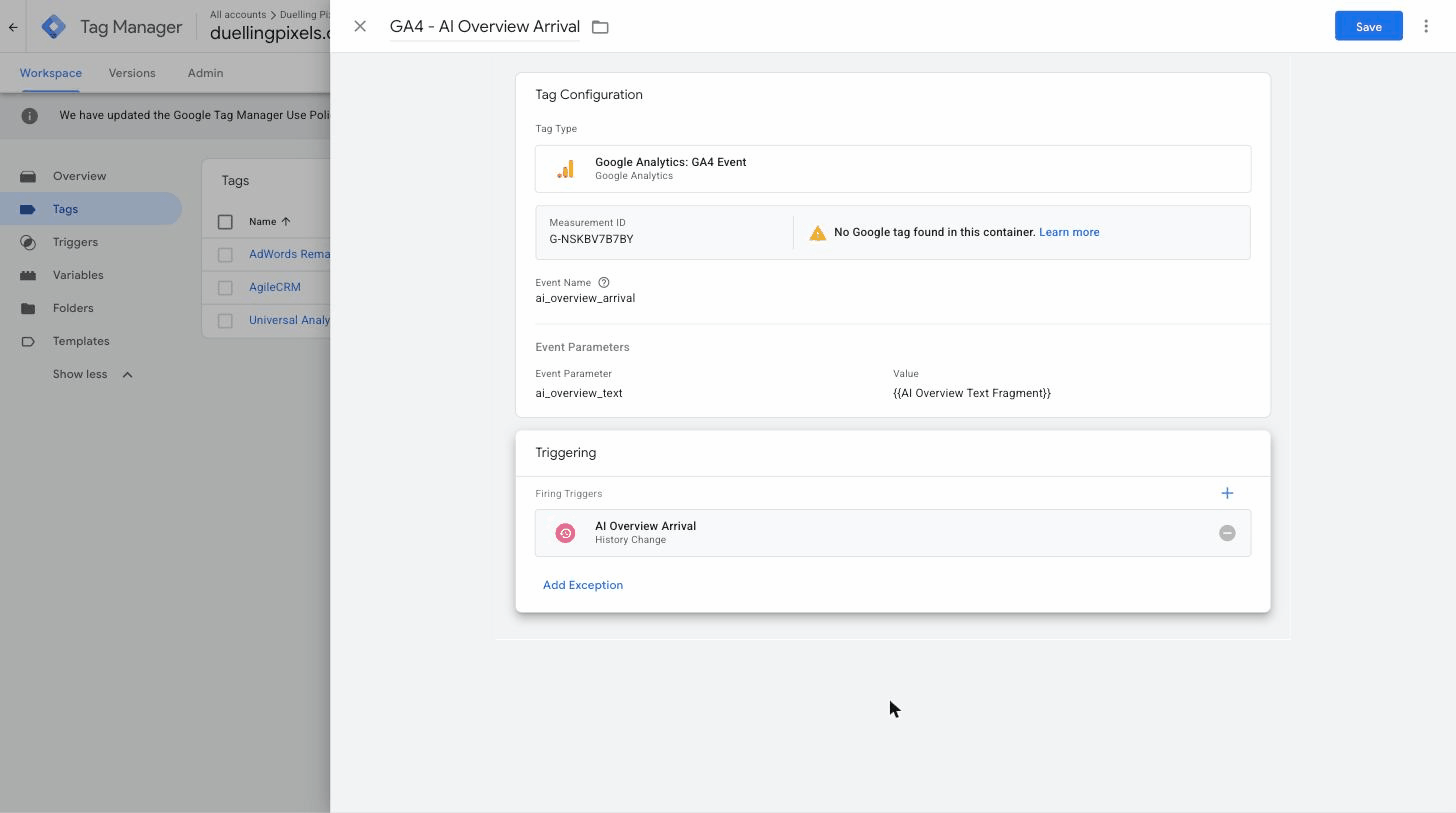
The setup takes four steps. One prerequisite before you start: your container needs the Google tag for your GA4 property in it already. If it does not have one, GTM will warn you that no Google tag was found when you build the event tag below, and the event will have nothing to attach itself to.
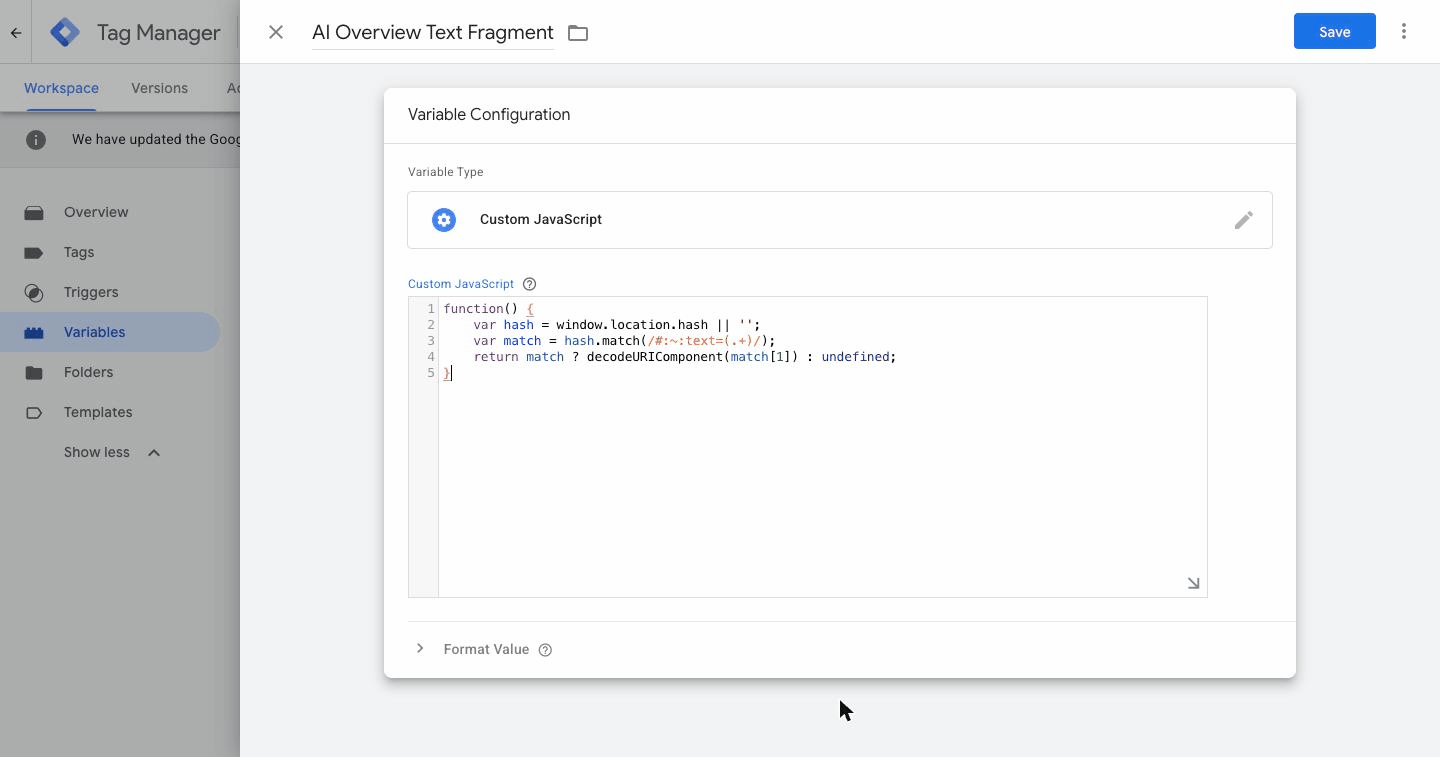
Step one. Create a Custom JavaScript variable in GTM that reads the page URL and extracts any string following #:~:text=.
function() {
  var hash = window.location.hash || '';
  var match = hash.match(/#:~:text=(.+)/);
  return match ? decodeURIComponent(match[1]) : undefined;
}
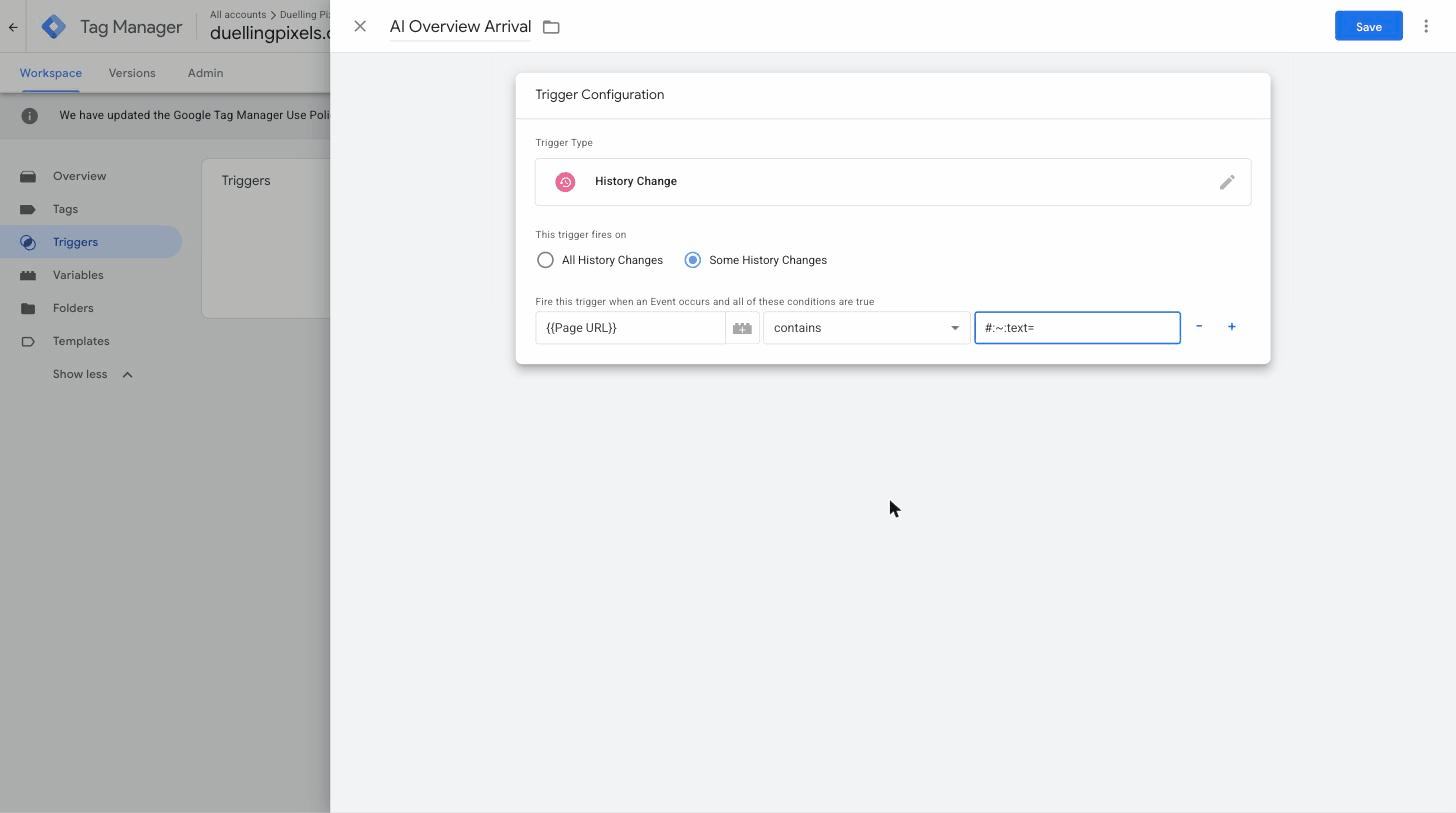
Step two. Add a History Change trigger, set it to Some History Changes, and give it one condition: Page URL contains #:~:text=. History Change rather than Page View, because the fragment often arrives after the initial page view has already fired. A plain contains is enough here, and it is harder to get wrong than a regex.
Step three. Add a GA4 Event tag pointing at your measurement ID, name the event ai_overview_arrival, and add one event parameter called ai_overview_text whose value is the variable from step one. Set the trigger to the one you just built.
Step four. Back in GA4, go to Admin > Data display > Custom definitions and register ai_overview_text as an event-scoped custom dimension. Skip this and the event will still arrive, but the quoted passage will never appear in a report. Remember to publish your GTM container once you have tested it, since none of this goes live until you do.
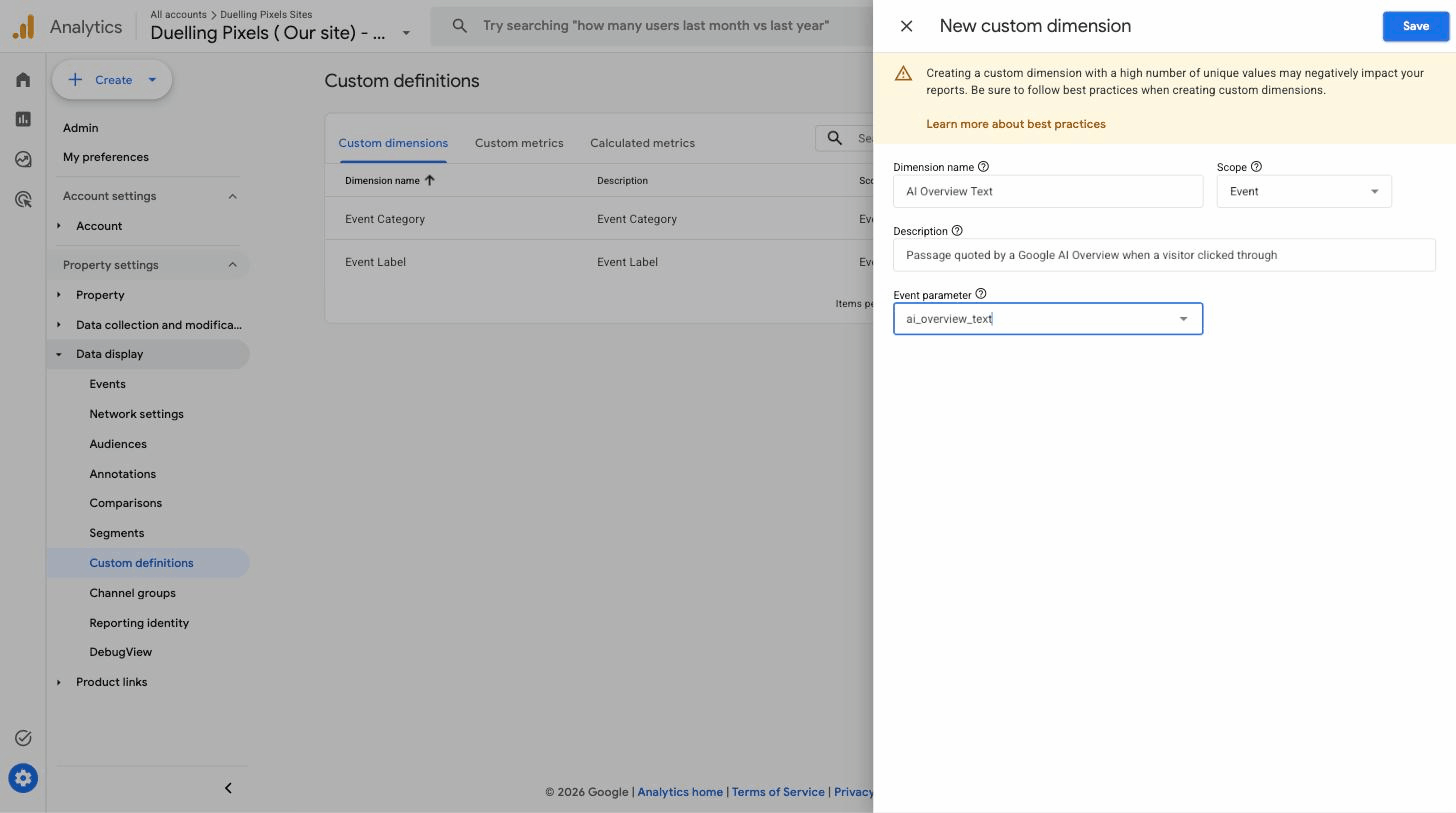
GA4 truncates the captured text at 150 bytes, and the truncation does not matter. The presence of the fragment is proof that the visit came from an AI Overview. One honest limitation to note is that this measures arrivals only. It tells you nothing about how many people saw the Overview and did not click. Google’s new Search Console reporting for AI features is beginning to fill that gap, and we covered those controls in the SEO vs AEO guide.
What to report each month
Retire gross traffic as your headline number and replace it with four figures that reflect how customers actually find you now:
- Generative share of voice across your ten test prompts, per platform.
- AI Search channel sessions and conversion rate compared to organic search.
- AI Overview arrivals from the text fragment event.
- Branded search volume, since people who read an AI answer often search your name next.
Together, these four turn “traffic is down” into “traffic is down, qualified visitors are up, and here is where they come from.” That is a report you can use to make decisions.
Setting this up takes a few hours once. Every site on our managed website growth plan gets this measurement layer built in, and if you want us to check what your analytics is currently missing, start with the free site audit.


Leave a Reply