
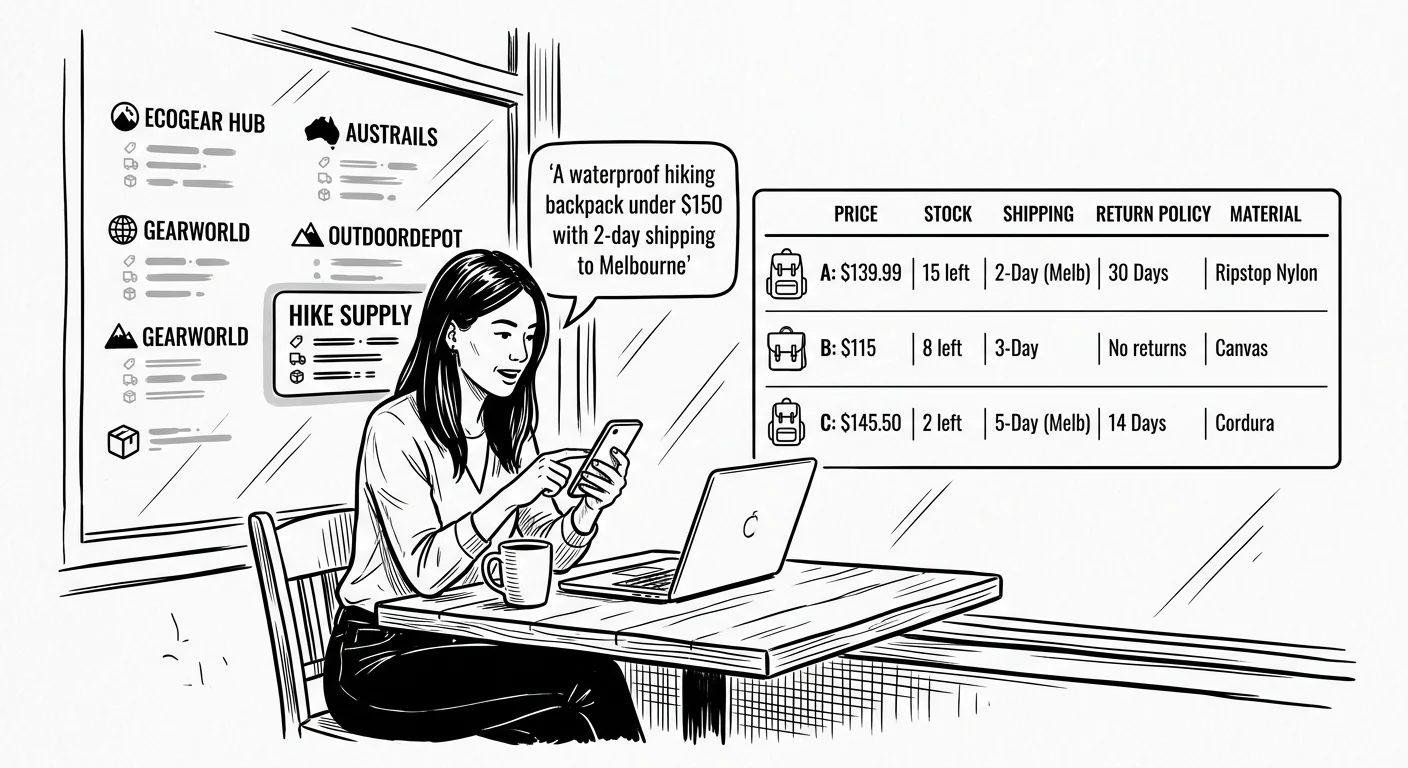
A customer asks ChatGPT to “find a waterproof hiking backpack under $150 with 2-day shipping to Melbourne.”
Your store ranks first on Google for “hiking backpacks”. You have the product. You have the price. Yet the AI recommends a competitor.
This happens because the AI didn’t visit your website. It queried a dataset.
For a decade, WooCommerce store owners optimised for human eyeballs. We built visual pages, wrote long descriptions, and chased keywords. That era is ending. AI search tools—from Google’s AI Overviews (formerly SGE) to ChatGPT and Perplexity—do not read websites the way humans do. They read structured data, vector embeddings, and product feeds.
If your store is not legible to these machines, you are invisible to them.
This article explains how AI search technically locates and interprets your WooCommerce products. It outlines the shift from keyword matching to “vector space” and details the specific data structures required to remain visible in 2025.
From Keywords to Vector Space
Traditional search engines work on “lexical matching”. If you type “crimson rucksack”, the engine looks for pages containing those exact words.
AI search works on “semantic meaning” using vector embeddings.
When an AI crawls your WooCommerce store, it converts your product data into numbers (vectors). It plots these numbers on a massive multi-dimensional graph. In this system, the concept of “crimson” is mathematically close to “red”. The concept of “rucksack” sits right next to “backpack”.
This means you no longer need to stuff every “keyword” into your product description. Instead, you need to provide clear, unambiguous data that the AI can map correctly.
The “Zero-Click” Reality
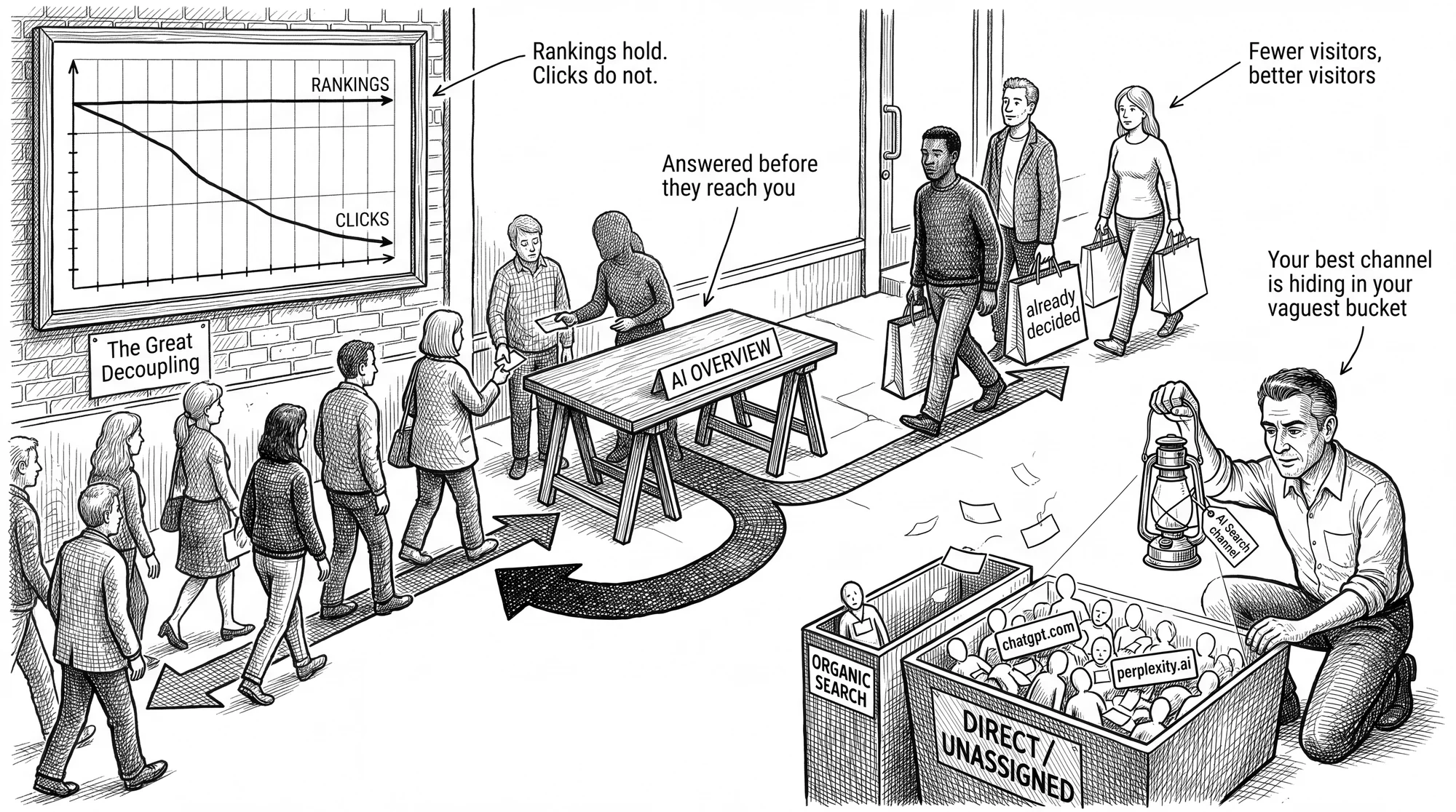
The goal of AI search is to answer the user’s question without forcing them to click a link. This is often called a “zero-click” search Textuar, 2026.
For store owners, this sounds alarming. Traffic numbers might drop. However, the remaining traffic is often higher-intent. If an AI recommends your product, the user is already near the point of purchase. The metric of success is shifting from “traffic volume” to “share of model”—how often an AI cites your brand as the answer, Fenti, 2025.
Your Feed Is Now Your Homepage
For Google’s AI tools (Gemini and AI Overviews), your actual website is secondary. The primary source of truth is the Google Shopping Graph.
This graph contains over 45 billion product listings, Google, 2025. When a user asks a shopping question, the AI first queries this graph. It checks for price, availability, and shipping speed before it ever looks at your site’s HTML.
The Merchant Centre Disconnect
Many WooCommerce stores treat their Google Merchant Centre feed as an afterthought. They use a free plugin to sync basic titles and images. This is a mistake.
If your feed lacks specific attributes—like return_policy_label, shipping_length, or condition—the AI cannot confidently recommend your product for specific queries. It will favour a competitor with complete data, even if their product is inferior.
To fix this, you must treat your product feed as your most important landing page.
- Sync everything. Don’t just sync required fields. Sync material, pattern, size system, and transit times.
- Update in real-time. AI agents punish data inconsistencies. If your feed says “In Stock” but your site says “Sold Out”, you lose trust, Trustana, 2025.

Structured Data, and The Syntax of Discovery
If the feed is your homepage, structured data (Schema) is your language.
AI models function like a “dependency grammar” parser. They look for a subject (your product) and its dependents (price, rating, stock status). Without clear labels, the AI has to guess. AI models hate guessing.
The Problem with Default WooCommerce Schema
Out of the box, WooCommerce provides basic Schema.org markup. It usually covers the product name and price. It often misses the granular details that AI agents look for, such as:
- MerchantReturnPolicy: Does the user have 30 days to return it? Is it free?
- ShippingDetails: specific delivery times and costs for different regions.
- hasMerchantReturnPolicy: Linking the return policy to the specific offer.
Without these specific “case markers”, the AI cannot verify your product fits the user’s criteria (e.g., “fast shipping” or “free returns”). GetPassionfruit, 2025.
Entity SEO
You need to move from “Keyword SEO” to “Entity SEO”. An entity is a clearly defined concept—like a specific brand, a material (Gore-Tex), or a colour.
Advanced SEO plugins like RankMath or Schema Pro allow you to nest these entities correctly. This helps the AI understand that “Gore-Tex” is the jacket’s material, not just a random word in the description (SEOPress, 2025).
The Agentic Web, When Software Buys
We are entering the phase of “Agentic Commerce”. This is where software agents (like ChatGPT) don’t just find products. They help users buy them.
Current web standards are designed for humans to click buttons. They are hard for robots to navigate. New protocols are emerging to fix this.
ACP and UCP
The Agentic Commerce Protocol (ACP) and Universal Commerce Protocol (UCP) are new standards. They allow AI agents to connect directly to your store’s database via API, Google Blog, 2025.
Instead of scraping your HTML, the AI sends a request: “Do you have SKU-123 in red?” Your store replies with a clean JSON data packet: “Yes, price is $50, shipping is $10.”
Early adopters are already testing plugins that enable this. Tools like the “Agentic Commerce Protocol” plugin for WooCommerce create these API endpoints automatically, WordPress.org, 2025.
While adoption is currently low—estimated at around 2% of stores—this is the future infrastructure of e-commerce, TJ Robertson, 2025.
To Block or Not to Block?
Many store owners block AI bots (like GPTBot) via their robots.txt file. They worry about their content being used to train models without compensation.
This is a valid concern for publishers. For merchants, it is likely a mistake. If you block the bot, the AI will no longer see your products. If it cannot see them, it cannot recommend them.
The pragmatic move is to allow reputable commercial agents (like GPTBot and Google-Extended) while blocking aggressive scrapers that offer no value, Search Engine Land, 2025.
Technical Debt is an AI Blocker
AI crawlers have a “crawl budget”. They have limited resources to spend on your site.
If your WooCommerce store is slow, the crawler leaves before it indexes everything.
The Plugin Problem
WooCommerce stores are notorious for “plugin bloat”. Owners add plugins for sliders, pop-ups, and social proof. Each plugin adds JavaScript and CSS files.
This code often blocks page rendering. An AI bot might see a blank screen or a spinning loader instead of your product price.
Research shows that excessive DOM size (too much HTML code) directly correlates with lower crawl rates ResearchGate, 2025.
To fix this:
- Review your plugins. Remove anything that doesn’t directly help sell a product.
- Use server-side caching. Serve a static HTML file to the bot immediately.
- Check your “Time to First Byte” (TTFB). It should be under 200ms.
Practical Implementation Steps
You can improve your store’s AI visibility without rebuilding it from scratch. Focus on data quality and technical performance.
1. Audit Your Merchant Centre Feed
Log in to Google Merchant Centre. Check the “Diagnostics” tab. Fix every warning, not just the errors. Ensure your “GTIN” (barcode) data is accurate. This is the unique ID that Google uses to track products across the web Google Support, 2025.
2. Upgrade Your Schema
Run a key product page through Google’s Rich Results Test. Look for “Merchant Listings”. If you see warnings about missing fields (shipping, returns, reviews), update your SEO plugin settings to include them.
3. Monitor AI Traffic
Google Analytics 4 (GA4) does not always categorise AI traffic clearly. It often appears as “Direct” traffic. You can set up specific Regex filters to track referrals from domains like chatgpt.com, perplexity.ai, and gemini.google.com, Jorge Argota, 2025.
4. Experiment with Vector Search
If your store has a search bar, consider upgrading it to a vector-based search tool. Plugins like “AI Vector Search” allow your internal site search to understand intent, not just keywords. WordPress.org, 2025. This improves the experience for human users and aligns your site structure with AI logic.
Conclusion
The “invisible storefront” is here.
Your human visitors see your homepage, your design, and your branding. AI visitors see your structured data, your feed, and your server response time.
To succeed in this new system, you must serve both audiences. You cannot rely on the strategies that worked in 2015.
Start by cleaning your data. Ensure your Merchant Centre feed is flawless. Add the missing Schema markup. Simplify your technical stack to improve speed.
The machines are already browsing your store. Make sure they can read the price tag.



Leave a Reply